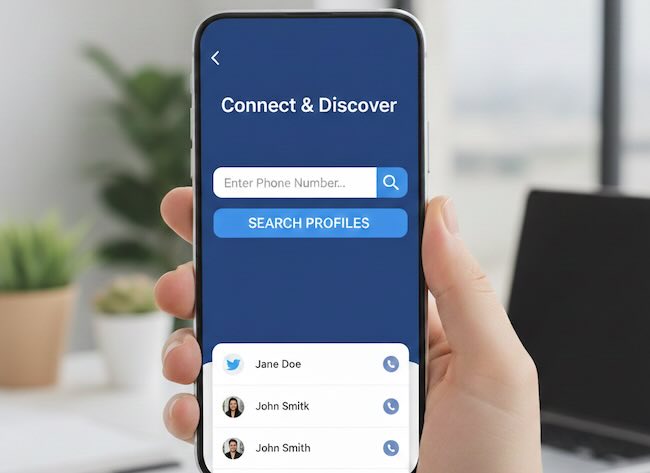
Text-based identity search is breaking down.
Names collide. Usernames rotate. Bios are rewritten. Handles are abandoned. But images persist.
A profile photo uploaded once can resurface years later on forums, corporate sites, archived pages, data brokers, and repost networks. Even when an account is deleted, its images often continue to travel. They are cached, resized, embedded, scraped, and redistributed across the public web.
This shift has changed how people search works. Discovery no longer begins with what someone writes about themselves. It begins with what they look like, what surrounds them, and where their images appear.
Visual OSINT, or open source intelligence based on images, reflects this reality. It combines reverse image search, computer vision, and contextual interpretation to move from a single photo to a broader understanding of an online identity.
This master guide brings together two dimensions of modern visual investigation. First, the practical workflow for finding where a photo appears and how it connects to profiles. Second, the advanced layer of AI-driven visual intelligence, including facial correlation, environmental analysis, and synthetic identity detection.
Why Images Are the New “Primary Key”
In traditional databases, a primary key uniquely identifies a record. Online, that role was once played by email addresses, usernames, and profile URLs. Today, images increasingly fill that function.
People can change their names. They rotate usernames. They separate professional and personal accounts. But they routinely reuse:
- The same profile picture
- The same professional headshot
- The same mirror selfie
- The same workspace or home background
Each reuse quietly links identities across platforms, even when no explicit connection exists.
Images also outlive profiles. Once published, they are copied into search indexes, archives, corporate sites, marketing tools, and social aggregators. Deleting a profile usually stops access. It rarely stops distribution.
This persistence makes images uniquely powerful anchors when names are missing, usernames have changed, or accounts are no longer active.
The Mechanics of Visual Discovery
Modern visual OSINT is not a single search; it is a three-layered investigation into the digital history, biological identity, and environmental context of an image.
1. Exact Match and Near-Duplicate Systems
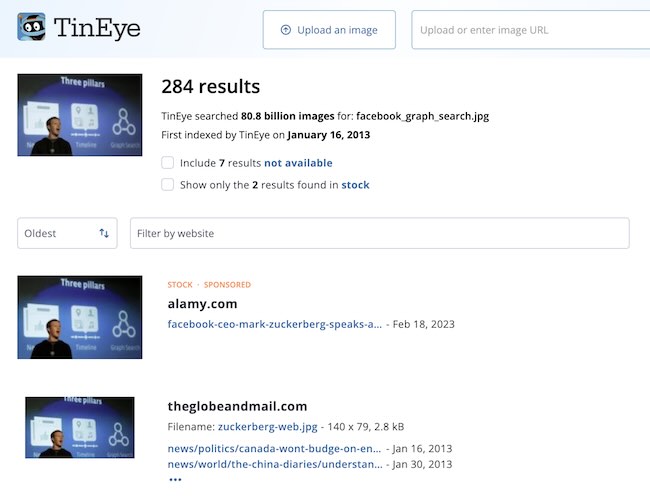
This layer focuses on the digital fingerprint of the file itself. These systems don’t care who is in the photo; they care where this specific cluster of pixels has traveled across the web.
- Primary Tool: TinEye
- Best for:
- Finding “Patient Zero”: Using TinEye’s “Oldest” sort to find the very first time an image was crawled.
- Tracking Scrapers: Locating where a specific profile picture has been duplicated across forum signatures or bot networks.
- Identifying High-Res Originals: Finding uncropped versions of an image that might contain more metadata or background detail.
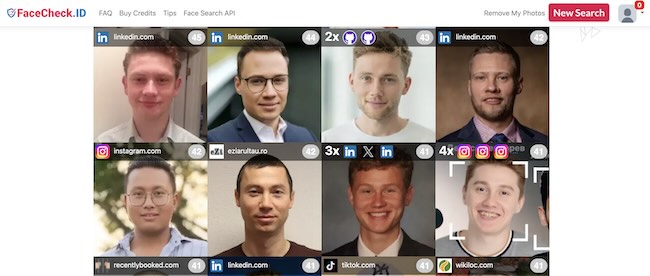
2. Visual Similarity and Facial Recognition
This layer shifts from “where does this file exist” to “where does this person appear.” These engines use biometric algorithms to map facial geometry—analyzing the “face fingerprint” that remains consistent even if the photo is different.
- Primary Tools: PimEyes, FaceCheck.ID, and Yandex Images
- Best for:
- Cross-Platform Correlation: Using FaceCheck.ID to find a target’s LinkedIn headshot starting from a casual social media photo.
- Cloning Identities: Using PimEyes to surface appearances in the background of event photos, news articles, or company blogs.
- Doppelgänger Filtering: Utilizing Yandex to find visually similar styles and faces to narrow down a person’s typical “online look.”
3. Contextual and Environmental Recognition
When the face is obscured or the person is unknown, the environment speaks. This layer analyzes objects, architecture, and brand signals within the frame.
- Primary Tools: Google Lens and Bing Visual Search
- Best for:
- Geographic Inference: Identifying a specific mountain range, street sign, or bridge using Google Lens to pin the target to a city.
- Professional Clues: Recognizing a company logo on a lanyard or a specific brand of industrial equipment using Bing Visual Search to identify a workplace.
- Lifestyle Mapping: Identifying clothing brands or luxury items to establish socioeconomic context and interests.
Choosing the Right Engines: Strategic Coverage
In practice, a professional investigator never relies on a single result. No engine indexes the entire visual web; instead, they provide different “vantage points” on an identity.
The Hybrid Workflow
For the most comprehensive Evidence Map, you should blend these engines based on your specific lead:
- If you have a Profile Picture: Start with TinEye for history and Lenso.ai to sort results into “People” vs. “Duplicates.”
- If you have a Face but no Name: Deploy FaceCheck.ID and PimEyes. These are your heavy lifters for breaking through to social media handles.
- If you have a Background/Scenery: Use Google Lens. It remains the gold standard for “Environmental Intelligence,” turning a window view or a hotel lobby into a GPS coordinate.
The 2026 Mantra: Diversity is not noise; it is coverage. If Google Lens returns nothing, it is likely because Google’s privacy filters are active. Pivoting to a biometric-first engine like FaceCheck.ID is often the key that unlocks the investigation.
| Engine | Type / Category | Strength + Weakness |
|---|---|---|
| Google Lens | Multimodal Contextual | Strength: Unrivaled for landmarks and OCR. Weakness: Aggressively blocks facial-identity matches for privacy. |
| PimEyes | Advanced Biometric | Strength: Massive crawl of news/blogs for “face fingerprints.” Weakness: Expensive paywalls and controversial data ethics. |
| Bing Visual Search | Commercial & Object | Strength: Excellent for products and corporate LinkedIn profiles. Weakness: AI depth is geared toward shopping, not OSINT. |
| Yandex Images | AI Visual Similarity | Strength: The most powerful free tool for facial similarity. Weakness: High rate of doppelgänger (lookalike) false positives. |
| TinEye | Forensic Pixel Match | Strength: Master of “Oldest” timestamps and original file sources. Weakness: Only finds the exact file; cannot find a different photo of a person. |
| Lenso.ai | Hybrid AI Category | Strength: Automated sorting into “People,” “Places,” and “Duplicates.” Weakness: Smaller overall database compared to Google/Bing. |
| FaceCheck.ID | Deep Biometric/Risk | Strength: Directly links faces to social media and public profiles. Weakness: Very narrow focus; ignores all non-human context. |
The 6-Step Visual OSINT Workflow
This workflow moves from a single, isolated image to a structured identity map, integrating modern AI-forensics to ensure your evidence is authentic.
Step 1: Preparation and Synthetic Screening
In 2026, the first question is no longer “Who is this?” but “Is this person real?” AI-generated faces (GANs) are frequently used for social engineering and fake profiles.
- The Process: Crop the image to the subject and remove any distracting “noise.”
- AI Forensics: Run the image through Winston AI or Sensity.ai to check for synthetic artifacts.
- Signs of “AI Ghosting”: Look for asymmetrical earrings, distorted hair-to-background boundaries, or “liquid” looking pupils.
Step 2: Multi-Engine Reverse Searches
Once authenticity is confirmed, deploy your multi-engine “Evidence Map.” Do not rely on a single source; different engines index different “slices” of the web.
- Action: Run the clean file through TinEye (for history), FaceCheck.ID (for social links), and Google Lens (for objects).
- Documentation: Note the Earliest Crawl Date and the Confidence Score of biometric matches.
Step 3: Source and Propagation Analysis
Look for the “Patient Zero” upload. Finding an image on a high-authority domain (like a government site or a corporate press release) is more valuable than finding it on a social media scraper.
- Strategy: Use TinEye’s “Oldest” sort to find the original uploader. If the page is gone, pivot to the Wayback Machine to see if a name or contact email was listed in the original version.
Step 4: Contextual and Geo-Temporal Analysis
If the face doesn’t yield a direct name, let the background speak. Use “Environmental Intelligence” to narrow down location and time.
- Visual Indicators: Analyze specific architecture, signage, or power outlet types.
- Temporal Cues: Use shadow length and direction to estimate the time of day and season. Tools like SunCalc or TimeSpot benchmarks can assist in verifying if the photo matches a target’s claimed location.
Step 5: Avatar and Asset Tracking
A “match” is often just a pivot point. Users are creatures of habit and often reuse the same avatar or “asset” across multiple personas.
- The Pivot: If you find the image on an obscure forum, extract the specific Username or Avatar and search them independently using tools like Sherlock or Maigret.
- Goal: Connect the photo to a handle, which often leads to a “main” account (LinkedIn, Instagram) where their identity is public.
If an image reveals only a real name but no handles, a structured real-name pivot is required. This process is outlined step by step in How to Find Social Accounts by Real Name.
Step 6: Transition to Identity Mapping
Visual OSINT is the “hook” that leads to SOCMINT (Social Media Intelligence). Your final step is to aggregate all found links, usernames, and locations into a single profile.
- Outcome: You are no longer looking at a photo; you are looking at a digital footprint. You have moved from a file to a human being with an established history.
How Images Propagate and Why It Matters
Images do not move randomly. They follow ecosystems.
Professional ecosystems
Headshots from corporate sites and conference pages spread into press releases, partner websites, blogs, and professional networks. This creates dense clusters around a single image.
Social redistribution
Social photos often migrate into forums, fan pages, newsletters, and marketing collateral. Each repost creates a new discovery surface.
Fraud and impersonation networks
Stolen profile photos frequently reappear across scam listings, dating profiles, and marketplace accounts. Visual correlation exposes these networks quickly.
Archival persistence
Search engines, caches, and archives preserve images long after originals disappear. These traces often surface historical identities.
Understanding propagation patterns helps interpret why an image appears where it does.
The “Fake Face” Problem: AI-Generated Profiles
The rise of generative AI has introduced a new layer of noise.
Synthetic faces are now used to:
- Populate fake professional profiles
- Support bot networks
- Create scam personas
- Seed influence operations
These images often do not exist anywhere outside the generated file itself.
Common synthetic artifacts
- Blurred or chaotic backgrounds
- Asymmetrical jewelry
- Warped eyeglasses
- Unnatural hairlines
- Inconsistent reflections
AI image forensics examines noise patterns, lighting consistency, and structural anomalies to flag synthetic origin.
Detecting artificial faces early prevents investigators from chasing identities that do not exist.
Visual Geolocation and Environmental Intelligence
Even when faces fail, environments speak.
Object and infrastructure signals
Power outlets, transit signage, gym equipment models, and furniture styles vary by country and industry. These cues often constrain geographic possibilities.
Workplace inference
Badges, uniforms, lab equipment, and office setups frequently reveal occupational environments.
Shadow and sun analysis
Shadows can approximate time of day and, combined with landmarks, narrow latitude ranges.
The satellite-to-social pipeline
When landmarks are identifiable, satellite imagery allows:
- Matching building layouts
- Comparing skyline features
- Estimating camera positions
- Narrowing capture windows
These methods do not provide certainty. They provide constraints.
False Matches and Verification Standards
Visual similarity is not identity.
Primary risks
- Look-alike individuals
- Stock image reuse
- Synthetic imagery
- Context collapse
Professional safeguards
- Never rely on a single match
- Correlate across multiple platforms
- Combine visual and textual evidence
- Document uncertainty
Verification emerges from consistency, not resemblance.
Ethics, Legality, and Responsibility
Images are not neutral data.
In many jurisdictions, biometric information carries legal sensitivity. Even when photos are public, how they are processed and stored may be regulated. The boundaries between public discovery and protected personal data are explained in detail in Is Social Media Search Legal? Understanding Public vs. Private Data.
Ethical visual OSINT requires:
- Legitimate investigative purpose
- Proportional use
- Respect for platform policies
- Clear separation between evidence and inference
The more powerful the method, the stronger the obligation to use it carefully.
Integrating Visual Intelligence into People Search
Visual OSINT rarely stands alone.
Images often reveal:
- Names on badges
- Usernames in watermarks
- Organizations in logos
- Locations in signage
These elements become anchors for structured user search workflows that map social profiles, communities, and historical footprints across platforms using a dedicated social media user search engine.
Conclusion
Reverse image search has evolved into visual identity intelligence.
Faces, environments, and visual patterns now function as primary keys across the web. AI systems extend discovery beyond file matching into correlation, inference, and historical reconstruction.
When applied responsibly, visual OSINT opens an identity layer that text-based search cannot reach.
It does not replace people search. It completes it.
FAQ: Visual OSINT and Facial Search
Can you really find people using only a photo?
Sometimes. Reverse image search can surface where a photo appears online, which may lead to profiles, names, or organizations.
How is modern visual search different from classic reverse image search?
Traditional systems focus on identical files. Modern systems correlate people, objects, and environments across different images.
Can AI find different photos of the same person?
Often yes, but results must always be verified with independent evidence.
How do you detect AI-generated profile photos?
By analyzing artifacts, lighting inconsistencies, and structural distortions common to synthetic imagery.
Is visual geolocation reliable?
It provides constraints, not certainty. It narrows possibilities rather than confirming locations.
What is the biggest risk in facial search?
False positives. Visual similarity alone is never sufficient for identity confirmation.
Is visual OSINT legal?
Laws vary by jurisdiction. Public images may still fall under biometric and privacy regulations. Usage must align with legal and ethical standards.
How does this support people search tools?
It surfaces names, usernames, and contexts that can then be expanded and verified through structured user search workflows.