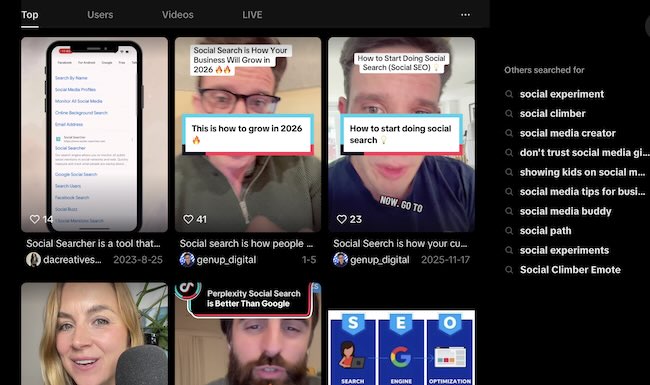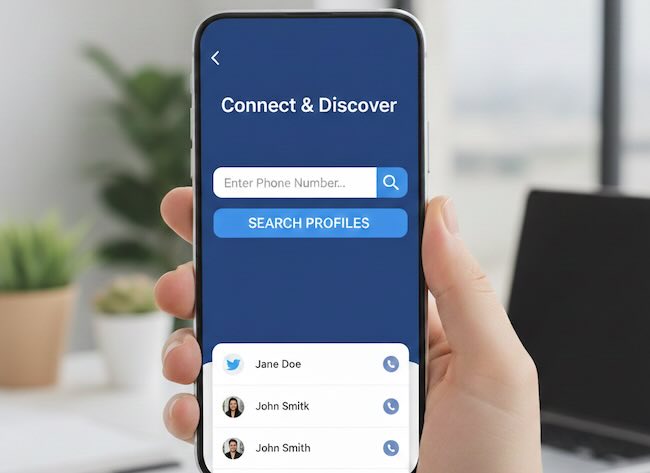
Most people assume that when a social media profile disappears, it is gone forever. The username no longer opens. The posts no longer load. The trail appears to end. In reality, the internet rarely forgets. Profiles are removed, suspended, or abandoned every day, but traces of them often remain scattered across search engines, archives, data aggregators, and third-party services.
Learning how to find old or deleted social media accounts is not about invading privacy or accessing anything hidden. It is about understanding how public data persists, how platforms distribute information, and how historical traces can still be located long after a profile stops being active.
This guide focuses specifically on historical and archival discovery. Not how to find active users. Not how to detect fake profiles. But how to surface what existed before. Old usernames. Deleted bios. Past posts. Traces of accounts that once shaped someone’s public digital footprint.
Deletion removes access. It rarely removes evidence.
This type of research is useful in many legitimate scenarios: brand protection, due diligence, digital forensics, journalism, fraud prevention, and even personal reputation management. Understanding where old data lingers is the first step to either finding it or managing it responsibly.
Why Deleted Accounts Often Leave Traces
Social platforms are only one layer of the public web. Around them exists an ecosystem of search engines, caching systems, archiving projects, marketing tools, monitoring platforms, and data aggregators. When a public profile exists, even briefly, parts of it are often copied, indexed, cached, quoted, or stored elsewhere.
Some common reasons deleted accounts still leave traces include:
- Search engines store cached versions of pages.
- Archival projects snapshot public URLs.
- Third-party tools continuously scrape public profiles.
- Other users quote, embed, or repost content.
- Marketing and analytics platforms log usernames and bios.
Deletion usually stops future access. It does not rewind the distribution that already happened. In many cases, the account still exists somewhere in the platform’s systems, but no longer surfaces through search, recommendations, or public directories. We explain this visibility shift in detail in Why You Cannot Find Some Profiles Online.
| Method | Best For… | Success Rate |
|---|---|---|
| Google Cache | Very recent deletions (days old) | Medium |
| Wayback Machine | Long-term history (years old) | High |
| Social Aggregators | Finding bios and old usernames | Medium-High |
| Image Search | Finding cached avatars and reposted profile images | Medium |
Each of these methods recovers different fragments. In most real investigations, the strongest results come from combining several of them rather than relying on a single technique.
The Cache Strategy: Seeing What Was Online Recently
Search engines can still reveal very recent traces of deleted content, but the way this works has changed significantly. In the past, Google and other engines exposed full cached copies of pages. Today, traditional search cache access is mostly gone, so researchers rely more on snippets, indexing delays, and external archives.
Google Cache: historical note (feature retired)
Google’s cache: operator and the visible “Cached” link in search results have been officially removed. The feature was originally designed for an earlier web era when pages frequently failed to load, but Google has retired it as modern web reliability improved.
Example (no longer functional):
cache:twitter.com/username
Running this query today will not return a cached snapshot. Google has fully discontinued public access to cached pages, and related documentation has been removed from Search Central.
What works instead
Even without a public cache, search engines remain useful for very recent discoveries:
- Search result snippets: profile names, bios, and short descriptions often remain indexed for hours or days after deletion.
- Indexed URLs: deleted profiles may still appear in search results before the index refreshes.
- “About this result” panels: Google occasionally links to archival resources such as the Internet Archive.
- Alternative archives: tools like the Wayback Machine and other web archives now serve as the primary source for historical snapshots.
Because Google Cache no longer exists, long-term recovery now depends more on web archives and social data aggregators rather than search-engine caching. Search engines are still useful — but mainly as discovery tools that point to surviving traces elsewhere on the web.
Using search snippets as historical hints
Even when cached pages are unavailable, search result snippets often expose fragments of what used to be visible. Bios, names, and descriptions can remain in snippets long after deletion.
Try searching:
- The exact profile URL in quotes
- The username combined with a distinctive phrase from the bio
- The username plus the platform name
Example:
“@exampleuser” “photography” site:twitter.com
Snippets can confirm existence, approximate topics, and sometimes link to secondary pages where the content was referenced.
Limitations of cache-based discovery
Caches are short-lived. Highly active platforms refresh frequently. Some platforms also block caching aggressively. This makes cache discovery useful mainly for recent deletions, usually within days or weeks.
When the cache is gone, the next layer is long-term archives.
The Wayback Machine for Social Profiles
The Internet Archive’s Wayback Machine is one of the most powerful tools for historical web research. It stores billions of snapshots of public web pages taken over many years.
Social platforms do not always archive perfectly, but many profiles, public posts, and bio pages have been captured at different points in time.
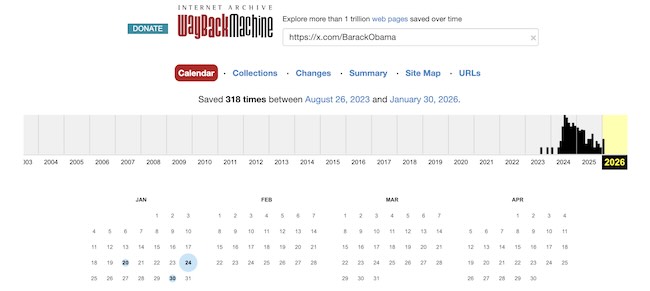
Step-by-step: checking a deleted profile
- Copy the full profile URL, for example: https://twitter.com/username
- Visit archive.org/web
- Paste the URL into the search bar
- Review the timeline of saved snapshots
- Click dates to view archived versions
Older snapshots may reveal:
- Previous usernames or display names
- Historical bios and links
- Profile images and banners
- Public posts or pinned content
Finding deleted Twitter or X threads
Public threads are often archived, especially when widely viewed or linked. If a tweet URL returns an error, paste the exact post URL into the Wayback Machine. You may find multiple captures showing how the thread evolved over time.
Sometimes only the shell loads, but quoted text, timestamps, and embedded media links can still provide valuable context.
Finding old Instagram bios
Instagram blocks many automated archivers, but profile pages are sometimes captured. Even when posts are missing, archived bios and profile descriptions often remain accessible. These can reveal former usernames, business links, or descriptions that help confirm identity continuity.
When archive.org fails
The Wayback Machine is not the only archive. Other regional archives, academic web collections, and nonprofit crawlers also store historical snapshots. Searching “site:archive.org username” or combining a profile URL with the word “archive” often surfaces alternative mirrors.
Username Ghosting: Detecting Recently Deleted Accounts
A common scenario occurs when a username appears unavailable, but visiting the profile URL returns a 404 or “page doesn’t exist” error. This often indicates a recently deleted, suspended, or renamed account.
Unavailable but not visible
Platforms handle deactivated usernames differently. In many cases:
- The username cannot be registered by others.
- The profile URL returns an error page.
- Search results still show historical references.
This state is often temporary. Platforms frequently reserve usernames after deletion for safety, anti-impersonation, or recovery reasons.
How to investigate ghosted usernames
When you encounter a ghosted handle:
- Search the exact username in quotes.
- Check Google Images for profile photos tied to that handle.
- Search archive.org for historical snapshots.
- Look for mentions on forums, news articles, or directories.
These methods often surface discussions, screenshots, or embedded links that preserve fragments of the deleted profile.
Why this matters
Username ghosting is a strong signal that an identity existed recently. It helps differentiate between “never used” and “previously active” handles. This is particularly useful in brand protection, impersonation investigations, and continuity research.
Third-Party Scrapers and Social Aggregators
Social platforms are not the only entities collecting public profile data. Marketing tools, social monitoring services, analytics platforms, and influencer databases routinely scan social networks and store information.
These services often retain data longer than the platforms themselves.
What social aggregators store
Depending on the service, they may store:
- Usernames and display names
- Historical bios and descriptions
- Profile images and banners
- Follower counts over time
- Post previews or excerpts
When a profile is deleted, these records may remain visible for months or even years.
How to find aggregator traces
Search patterns that often surface archived aggregator pages include:
- “username” “Twitter profile”
- “username” “Instagram bio”
- “username” “followers”
- “username” site:about.me
- “username” site:pastebin.com
Many influencer tools generate public landing pages. Forum bots log social handles. Marketing directories snapshot bios. All of these can preserve identity data long after deletion.
Ethical note on third-party data
The existence of third-party records does not remove ethical or legal responsibilities. Even when data is public, it must be used with legitimate purpose, respect for privacy laws, and careful handling. Discovery should never cross into harassment, misuse, or unauthorized access.
Following the Trail: From Old Handle to Current Presence
Finding an old or deleted account is often only the beginning. Many people reappear under new usernames or migrate to different platforms.
Once a historical handle is identified, it becomes a valuable pivot point. Old usernames frequently resurface on other platforms, forums, marketplaces, or comment systems.
Once you’ve identified a deleted handle, use our social media user search engine to see if they’ve moved to a new platform under the same name.
When a deleted account reappears, it is often under a slightly modified handle. Dots are added, numbers appear, words are rearranged, or platform-specific naming rules change the structure. If direct searches fail, our guide Username Variations: How to Guess Someone’s Handle explains how to systematically expand a handle into realistic alternatives.
This cross-platform approach often reveals whether an identity was abandoned completely or simply relocated.
Image Traces: Recovering Deleted Accounts Through Visual Footprints
When a social media account is deleted, text often disappears first. Bios change. URLs break. Posts return errors. Images behave differently.
Profile photos, banners, and posted images are frequently cached, copied, re-uploaded, embedded, and indexed across many services. In many investigations, the strongest remaining signal of a deleted account is not a username. It is an image.
Platforms remove profiles. The web keeps copies.
This makes image search one of the most overlooked but effective methods for finding traces of deleted accounts.
Why images survive account deletion
- Search engines index images separately from profile pages.
- Marketing and analytics tools cache profile pictures.
- Other users repost avatars and screenshots.
- Forums and news sites embed social images.
- CDN URLs often remain accessible after deletion.
Even when the original account no longer exists, the image files often continue to appear across the public web.
How to use image search for deleted accounts
If you have a profile picture, banner image, or screenshot from the deleted account:
- Upload it to major reverse Image Search engines.
- Search using the original image URL if available.
- Crop faces, logos, or distinctive areas and search again.
- Repeat searches over time as new pages surface.
Results often reveal:
- Archived profile pages
- Old aggregator listings
- Forum discussions quoting the account
- Reposts on other platforms
- News or blog references
Common visual recovery patterns
In historical research, image searches most often surface three useful categories of results.
Cached profile assets. Old avatars hosted on social CDNs, marketing tools, or influencer databases.
Reposted identity traces. Screenshots and embeds preserved by other users.
Contextual references. Blog posts, news articles, or community discussions that include the profile image.
Limitations of image-based discovery
Image search rarely reconstructs an entire profile. It typically recovers fragments. A username. A display name. A linked platform. A timeframe.
Visual traces are most powerful when combined with archive tools, search snippets, and third-party records.
Used responsibly, image search acts as a bridge. It reconnects deleted profiles to the broader web that once interacted with them.
Common Pitfalls in Historical Profile Research
Assuming deletion means erasure
Most traces live outside the platform itself. Focusing only on the original network often misses the majority of available data.
Trusting single sources
Archived content can be incomplete, misdated, or out of context. Always corroborate across multiple independent sources.
Confusing name collisions
Usernames are not unique across the entire web. Old traces may belong to different individuals who happened to share the same handle. Identity confirmation requires consistency across multiple signals.
Ignoring legal and ethical boundaries
Historical discovery should stay within publicly accessible material and legitimate research purposes. Deleted does not mean fair game for harm.
Why Historical Discovery Matters
Old social profiles often carry information that active profiles no longer show. Past affiliations, abandoned projects, previous branding, early communities, and forgotten content can all shape how identities are understood.
For organizations, this supports due diligence and risk analysis. For individuals, it informs reputation management. For researchers, it builds continuity across time. For investigators, it fills the gaps that active profiles leave behind.
The present tells you who someone is today. The past often explains how they got there.
Understanding how to locate and interpret historical traces is a foundational skill in modern identity research.
Conclusion
Deleted social media accounts rarely vanish completely. They fragment. Parts remain in caches. Others persist in archives. More live on in third-party systems that mirrored what was once public.
By combining cache checks, web archives, username analysis, and aggregator discovery, it is often possible to reconstruct pieces of a digital past that no longer exists in one place.
Used responsibly, these methods support transparency, accountability, and informed understanding of public digital histories.
FAQ: Finding Old or Deleted Social Media Accounts
Can you really see deleted social media profiles?
Sometimes. Search engines, web archives, and third-party services may still hold snapshots or references to profiles that have been removed.
How long does Google keep cached pages?
There is no fixed timeline. Cached versions may persist from hours to weeks depending on crawl frequency and platform restrictions.
Does the Wayback Machine archive all social networks?
No. Coverage varies by platform, privacy settings, and crawling permissions. Public profiles are more likely to be archived than private ones.
What does it mean when a username is unavailable but shows a 404 page?
It often indicates a recently deleted, suspended, or renamed account whose handle is still reserved by the platform.
Are third-party social aggregators reliable?
They can provide useful historical traces, but their data may be incomplete or outdated. Always validate across multiple sources.
Is it legal to search for deleted social media accounts?
Searching public archives and publicly accessible pages is generally lawful, but data protection and privacy laws still apply to how information is processed and used.
Can deleted profiles reappear?
Yes. Some users reactivate accounts, recover handles, or return under new usernames.
What is the safest way to continue research after finding an old handle?
Use structured cross-platform searches and verification tools, and focus on consistency across multiple independent sources.