Email addresses sit at the center of modern digital identity. Long before someone chooses a username or uploads a profile photo, they create an email. It becomes the key that unlocks accounts, receives notifications, verifies logins, and connects services. While names can change and profiles can disappear, email addresses often remain stable for years.
This persistence makes email one of the most powerful starting points in identity research. When used responsibly and within ethical boundaries, an email address can reveal how an identity spreads across platforms, where it has been publicly exposed, and which services it has touched.
On the internet, usernames decorate identity. Email addresses quietly power it.
This guide explores how social profiles can be discovered from an email address by examining how emails become public, where they surface, and how to correlate results without overstepping legal or ethical limits. This is not about underground databases or intrusive lookups. It is about understanding public exposure, breach awareness, and open-source intelligence boundaries.
Why Email Is the Backbone of Digital Identity
Almost every major platform uses email as its primary identifier. Even when users log in with phone numbers or social buttons, email often exists behind the scenes as the account anchor.
Email functions as:
- The account recovery channel
- The verification endpoint
- The notification hub
- The login credential
- The cross-service connector
Because of this, people tend to reuse the same email across platforms, projects, forums, and subscriptions. Over time, that reuse creates a web of public and semi-public references.
Unlike a username, which may be unique to one platform, an email address often links years of activity across unrelated services.
How Email Addresses Become Public
Most people never intentionally publish their email widely. Yet email addresses appear online constantly.
Profile and contact pages
Personal websites, portfolios, business pages, and author bios frequently display email addresses for contact purposes. These pages are indexed by search engines and archived by third parties.
Forums and community posts
Older forums often exposed emails by default. In some niche communities, users still share contact addresses in posts, signatures, or profiles.
Code repositories and technical platforms
Commit histories, bug trackers, and documentation systems often include emails tied to accounts. Even when hidden on profile pages, they may appear in metadata.
Data breaches and leaks
When services are compromised, email lists may surface publicly. While accessing stolen databases is unethical and often illegal, the downstream effects include emails appearing in indexed reports, alerts, and breach notification platforms.
Third-party integrations
Marketing tools, newsletter systems, comment engines, and social plugins frequently capture and expose email-related identifiers.
Each exposure adds another thread that connects an email address to an online identity.
Platforms Where Emails Commonly Surface
Email addresses tend to appear in predictable categories of platforms.
- Personal websites and portfolios
- Company staff directories
- Blog author pages
- Forum profiles
- Code repositories
- Conference speaker pages
- Online resumes and CVs
- Archived newsletters
Searching across these surfaces often reveals not only the email itself, but names, usernames, photos, and links to social profiles.
Search Logic: How to Start with an Email
Exact match search
The simplest approach is still powerful. Searching the full email in quotes often surfaces contact pages, cached documents, and public profiles.
“name@example.com”
This can reveal websites, PDFs, spreadsheets, forum posts, and archived pages.
Username extraction
Many emails contain a username segment. Searching that part separately may surface social profiles, forum accounts, and reused handles.
For example, from:
alex.photo@gmail.com
You might search:
- “alex.photo”
- “alexphoto”
- “alex photo” photography
This often leads to profile pages even when the email itself is no longer visible.
Domain analysis
Company or organization domains provide context. Searching the domain may surface staff pages, author profiles, and social links.
site:company.com “@company.com”
This can uncover internal directories and profile hubs.
The Password Recovery Method (Legal OSINT)
Many platforms allow users to check whether an email is associated with an account through the “Forgot password” function.
When used correctly, this method does not access any private data. It simply confirms whether a given email is registered.
How it works
On many social platforms and services, entering an email into the password recovery form returns messages such as:
- “We sent a reset link to your email.”
- “No account found with that address.”
This allows confirmation of whether an email is associated with an account without resetting anything.
What this can tell you
- Which platforms an email is linked to
- Whether the email has been used for major social networks
- Which services may contain related profiles
Important boundaries
This technique must never be used to attempt access, reset credentials, or interfere with accounts. Its only ethical purpose is account existence confirmation.
Repeated automated probing may violate platform terms. Use sparingly and responsibly.
Gravatar and Hashed Email Discovery
One of the most overlooked email-based discovery systems is Gravatar.
How Gravatar works
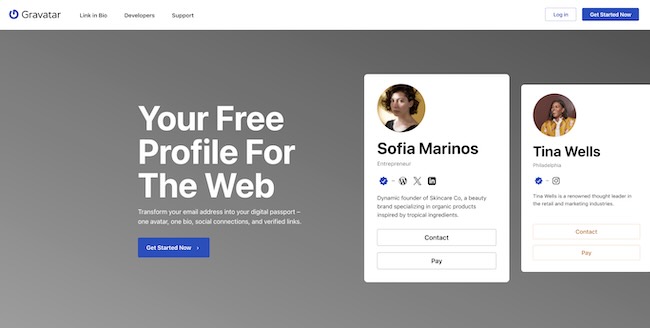
Gravatar allows users to associate a profile image and short bio with their email address. Instead of storing the email publicly, Gravatar uses a cryptographic hash of the email.
Many platforms, especially WordPress-based sites, automatically pull Gravatar images when someone comments or registers.
Why this matters
If an email has been used to create a Gravatar profile, that profile image may appear across thousands of sites.
Gravatar profiles can include:
- Profile photos
- Display names
- Websites
- Short biographies
These elements often link directly to social profiles.
Practical value
Finding a Gravatar image allows you to:
- Identify profile photos reused elsewhere
- Pivot into reverse image search
- Locate blogs and forums where the user commented
- Extract names and websites tied to the email
Because WordPress powers a large portion of the web, this technique frequently surfaces unexpected identity traces.
How Identities Connect Through Email Reuse
Email reuse creates bridges.
The same address might be used for:
- A GitHub account
- A personal blog
- A conference speaker profile
- A newsletter platform
- A forum login
Each platform exposes different pieces. One reveals a real name. Another reveals a username. A third shows a profile picture. A fourth links to social networks.
Email-based discovery is rarely about finding a single profile. It is about assembling fragments into a coherent identity picture.
Correlation vs Certainty
Email searches often produce indirect signals.
Correlation
Same email on two sites strongly suggests the same user. Same Gravatar image across domains suggests a shared identity. Consistent naming patterns strengthen confidence.
Certainty
Certainty comes only when multiple independent elements align:
- Matching email exposure
- Consistent names
- Shared images
- Linked websites
- Cross-referenced social profiles
Any single result should be treated as a lead, not a conclusion.
Fraud and Impersonation Risk
Email-based discovery also exposes a major risk area.
Fraud actors often:
- Reuse breached emails
- Create look-alike domains
- Impersonate real individuals
- Register accounts across multiple platforms
Finding social profiles tied to an email can reveal impersonation networks, fake support accounts, or coordinated scam operations.
This is why correlation must always be combined with verification.
Privacy and Legal Exposure
Email addresses are considered personal data in most jurisdictions.
Even when they appear publicly, their collection, storage, and processing may fall under data protection laws.
Responsible research requires:
- Legitimate purpose
- Minimal data handling
- Clear documentation of sources
- Awareness of jurisdictional regulations
For a deeper explanation of boundaries between public and private data, see our guide on public vs private social data.
Ethical OSINT Framing
Ethical email-based research follows three principles:
- Only work with data that is publicly accessible or voluntarily exposed
- Never attempt unauthorized access
- Use findings to inform, protect, or verify, not to exploit
The presence of data does not automatically grant permission to misuse it.
Defensive Recommendations
Email discovery is not only investigative. It is educational.
Understanding how emails surface helps individuals and organizations reduce exposure.
- Use separate emails for public and private activity
- Audit where your email appears online
- Review Gravatar and third-party profile settings
- Remove old forum accounts where possible
- Limit email exposure on public websites
Defensive awareness is one of the strongest outcomes of email-based OSINT.
From Email to Full Identity Mapping
Email discovery often produces names, usernames, images, and websites.
If you only have an email, start here. Once you extract a name or handle, move to our main user search to see the full footprint across social networks.
This transition from email anchor to cross-platform mapping is where identity research becomes truly effective.
Conclusion
Email addresses quietly connect the modern web.
They surface in places people forget. They persist through platform changes. They link personal, professional, and technical identities.
When approached ethically, email-based discovery provides one of the most reliable entry points into understanding how an online identity is distributed across platforms.
It is not about invasion. It is about visibility, verification, and awareness.
FAQ: Finding Social Profiles by Email Address
Can you really find social profiles from an email?
Sometimes. Public exposure, forum profiles, Gravatar data, and linked websites can reveal names, images, or usernames connected to the email.
Is using password recovery forms legal?
Checking whether an account exists is generally permitted, but attempting to reset or access accounts is not. Always follow platform terms and legal requirements.
What is Gravatar and why is it important?
Gravatar links profile images and bios to email hashes. These images often appear across WordPress and related platforms, creating discovery paths.
Are breach databases part of ethical OSINT?
Public breach notification platforms may indicate exposure, but accessing stolen data directly is unethical and often illegal.
Does finding the same email on two sites confirm identity?
It strongly suggests a connection, but additional verification should always be performed.
What is the biggest mistake in email-based research?
Assuming a single match equals certainty without corroborating evidence.
How can people protect themselves?
By limiting public email exposure, separating addresses by purpose, and auditing where their emails appear online.
How does this connect to user search tools?
Email discovery provides starting points that can be expanded into structured cross-platform searches using dedicated user search systems.